
Weather Company Feed
Last Updated: 17 Apr 2017
Please note that as of version 5.1.0.0 of Matrix, the functionality described on this page has been deprecated.
A Weather Company Feed asset allows subscribers to The Weatherzone's RSS Feed (formerly The Weather Company) to display information about the weather in their site. Each record in the XML feed will be displayed as a shadow asset in the Asset Map. From there you can use the tools within Squiz Matrix, such as an Asset Listing, to display this information in your site. Please note that the RSS Feed subscription is not a free service; you will need to contact Weatherzone for details.
Once you have created your Weather Company Feed, you can configure the asset on its associated screens. Many of these screens are the same or similar to those for a Standard Page and are described in the Asset Screens manual. In this chapter we will only describe the Details screen, which is different for a Weather Company Feed.
Details Screen
The Details screen allows you to configure the Weather Company Feed. For more information on the Status, Future Status, Thumbnail and Details sections of the Details screen, refer to the Details Screen chapter of the Asset Screens manual.
XML Feed Details
This section allows you to set up the Weather Company Feed.
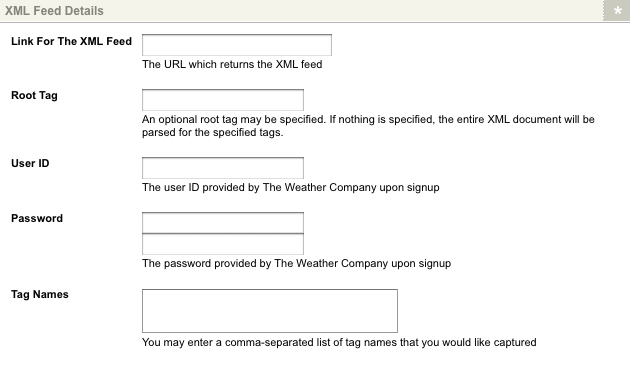
The XML Feed Details section of the Details screen
The fields available are as follows:
- Link For The XML Feed: enter the hyperlink for the XML feed. Weatherzone will supply this URL.
- Root Tag: enter a tag to start reading the XML feed from. If nothing is specified, the entire XML feed will be parsed for the tags that have been specified in the Tag Names field.
- User ID: enter the user ID that has been provided by Weatherzone.
- Password: enter the password that has been provided by Weatherzone.
- Tag Names: enter a comma-separated list of tags that you would like to use from the XML feed provided by Weatherzone.
Once you have entered the details into these fields and clicked Commit, shadow assets will appear in the Asset Map under the Weather Company Feed. Each shadow asset represents one item from the XML feed. For more information on shadow assets, refer to the Shadow Asset chapter in this manual.
Tag Attributes
The Tag Attributes section allows you to return attributes of specified tags exposed on the Weather Company Feed. The Tag Attributes section of the Details screen is shown in the figure below.
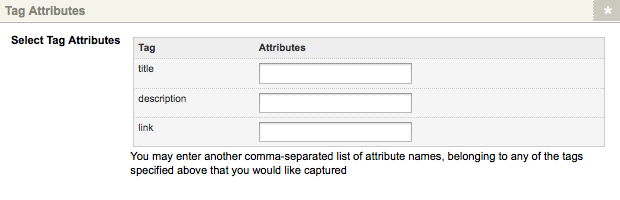
The Tag Attributes section of the Details screen
The tags exposed on the Weather Company Feed will be displayed in the Select Tag Attributes field. In the corresponding Attributes field(s), enter the tag attributes names to return.
Shadow Asset Name
The Shadow Asset Name section allows you to specify the name of the Shadow Assets that appear under the Weather Company Feed in the Asset Map, as well as providing a list of available keyword replacements for these assets. The Shadow Asset Name section of the Details screen is shown in the figure below.
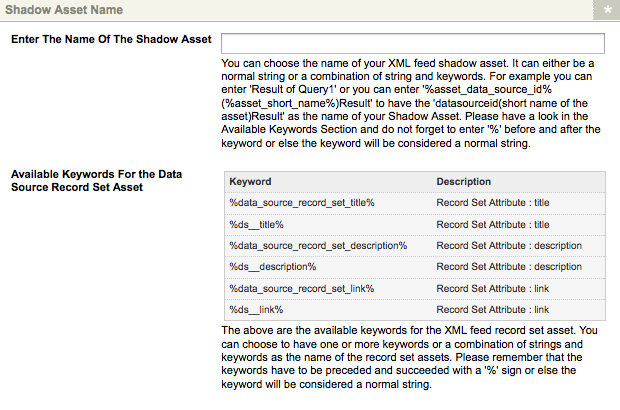
The Shadow Asset Name section of the Details screen
In the Enter The Name of the Shadow Asset field, enter the name that should be used for shadow assets exposed by the Weather Company Feed. This name can either be a normal string or a combination of a string and keyword replacements, for example, the keyword replacement %ds_title% could be used to display the title data of the returned records as the names of your shadow assets.
A list of keyword replacements is displayed in the Available Keywords for the Data Source Record Set Asset field, exposing the attribute values of the Shadow Assets returned on the Weather Company Feed. These keyword replacements can be used when defining the Shadow Asset name format, as well as to print XML data on a Site, for example, using an Asset Listing Page.
Please note that the keyword replacements listed in the Available Keywords for the Data Source Record Set Asset field will differ depending on the record attributes returned on the Weather Company Feed.
Example of Setting Up a Weather Company Feed
The information returned on a Weather Company Feed can be used within a Site, for example, via an Asset Listing. To see how this works consider the example of showing the Sydney weather feed on a Site.
The Weather Company Feed
Create and configure the Weather Company Feed asset under your Site. You will need to obtain the XML feed URL and authentication details from Weatherzone. For more information on obtaining a paid weather subscription, refer to the Weatherzone web site.
Once you have set up the Weather Company Feed, the returned records will be displayed as shadow assets under the Weather Company Feed in the Asset Map.
Asset Listing
Create an Asset Listing under your Site, configuring it to list the Data Source Record Set assets under the Weather Company Feed.
You can alter the information displayed for each listed record using the keyword replacements displayed in the Available Keyword Replacements... field on the Details screen of the Weather Company Field. On the Default Format Bodycopy of the Asset Listing, configure the format of the listed items by using these keyword replacements, for example:
<h4>%ds__title%</h4>

<p>%ds__description%</p>

<p><a href="%ds__link%">Read more...</a></p>
This format will display the title and description of each record within the feed, as well as its link to the Weatherzone website. This information can be seen when viewing the Asset Listing on the frontend, as shown in the figure below.
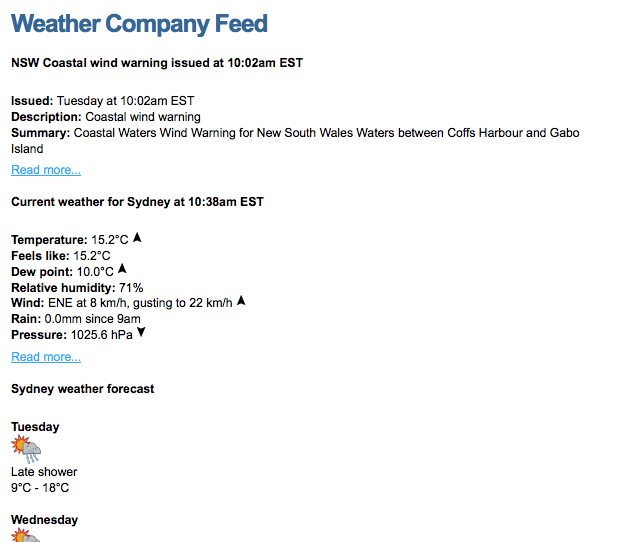
An example Weather Company Feed listed on an Asset Listing
Now that this Asset Listing has been configured to list the records of the Weather Company Feed, it can be used elsewhere within your Site, for example, nested within its Design.