
Messaging Service Configuration
Last Updated: 22 Dec 2016
The Messaging Service Configuration screen allows you to edit the internal message settings of the system including which messages are logged to the database and which messages are sent via email. A list of all internal messages that are available is provided in the Internal Message Types section below.
Messaging Service Configuration
To access the Messaging Service Configuration screen, click on the System Configuration  icon in the top right hand corner of the screen – a drop down list will appear under this icon. From this list, select Messaging Service Configuration – the screen will appear.
The fields that are available are outlined below.
- Log To File White List: the Log To File White List is shown in the figure below.
This field allows you to specify the internal messages that will be written to the system log file. The default value is * meaning that all internal messages will be logged. If you only want to log certain messages remove the * and add them to this field.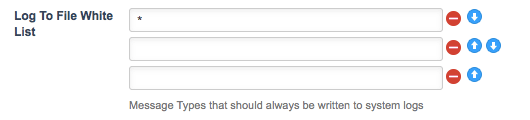
The Log to File White List - Log to File Black List: the Log To File Black List is shown in the figure below.
This field allows you to specify the internal messages that will not be written to the system log file. By default, the internal messages that will not be logged include asset.attributes, asset.workflow.invitation, asset.workflow.announce, asset.workflow.invitation.* and asset.workflow.announce.*. For further information on what these internal messages are, see the Internal Message Types section below.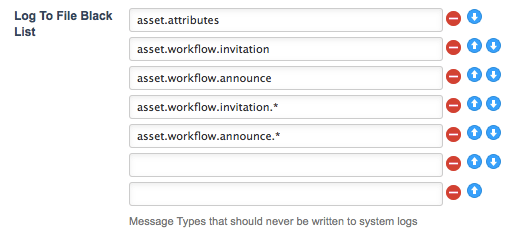
The Log to File Black List - Log To Database White List: the Log To Database White List is shown in the figure below.
This field allows you to specify the internal messages that will be written to the database and shown on the Logs screen of an asset. The default value is * meaning that all internal messages will be logged to the database. If you only want to log certain messages, remove the * and add them to this field.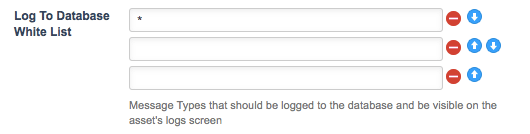
The Log to Database White List - Log To Database Black List: the Log To Database Black List is shown in the figure below.
This field allows you to specify the internal messages that will not be written to the database and are not shown on the Logs screen of an asset. By default, the internal messages that will not be logged include asset.attributes.fulllog, asset.workflow.invitation, asset.workflow.announce, asset.workflow.invitation.*, asset.workflow.announce.* and install.*. For further information on what these internal messages are, see the Internal Message Types section below.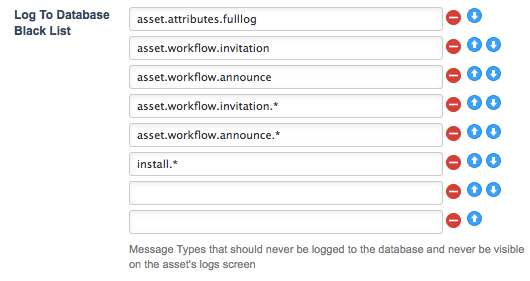
The Log to Database Black List - Log To Email White List: the Log To Email White List is shown in the figure below.
This field allows you to specify the internal messages that will be emailed to users. By default, the internal messages that will be emailed include asset.locking.forced, config.*, hipo.*, inbox.*, asset.status.notify, asset.workflow.invitation, asset.workflow.announce, asset.workflow.invitation.*, asset.workflow.announce.*, asset.workflow.stale and cron.deadlock. For further information on what these internal messages are, see the Internal Message Types section below.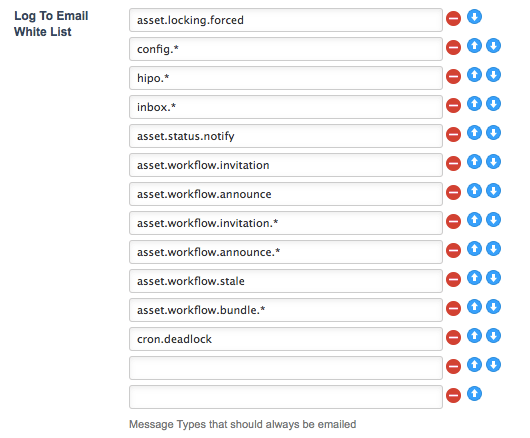
The Log to Email White List - Log To Email Black List: the Log To Email Black List is shown in the figure below.
This field allows you to specify the internal message that will not be emailed to users. This field is blank by default.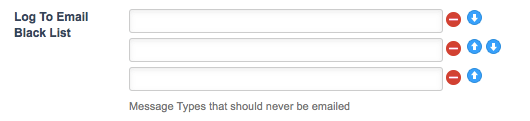
The Log to Email Black List
Messaging Service Email Format
Emails sent by Squiz Matrix's messaging service contain an email footer that, by default, specifies the details of the system being run, including its version number and system root URLs.
This is an automated message from Example System Name running Squiz Matrix v5.0.0.0
System Root URLs :
www.example.squiz.net

Contact (admin@squiz.com.au) for support.
The Messaging Service Email Format section allows you to customise this footer information for emails sent by your system. The fields available in this section are shown in the figure below.
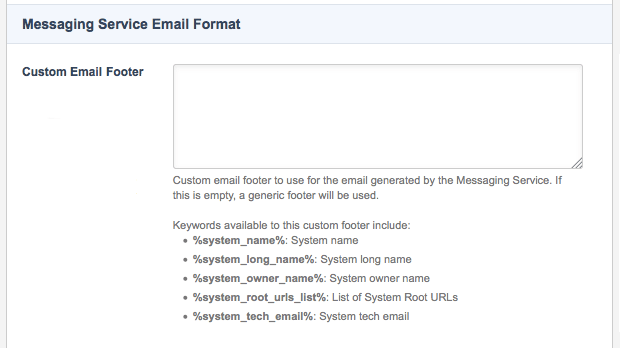
The Messaging Service Email Format section
In the Custom Email Footer field, enter the content that you want to use as the footer for emails sent by Squiz Matrix's messaging service. The following keyword replacements can be used in this field to display the information of your system within the email footer:
- %system_name%
- %system_long_name%
- %system_owner_name%
- %system_root_urls_list%
- %system_tech_email%
Internal Message Types
Below is a table outlining the internal messages that are available for the system. It includes the code for the message and the information that is logged to either the system log file, the database or sent in the email. The information uses keyword replacements and will substitute the keyword with information from the asset that caused the internal message.
| Message | Code | Information that is logged |
|---|---|---|
| Asset Created | asset | New %type_code% "%asset_name%" created. |
| Asset Attribute Changed | asset.attributes | The value of attribute "%attr_name%" for asset "%asset_name%" has been changed. |
| Asset Attribute Changed | asset.attributes.fulllog | The value of attribute "%attr_name%" for asset "%asset_name%" has been changed from "%old_value%" to "%new_value%". |
| Asset Attribute Changed | asset.attributes.fulllog.scalar | The value of attribute "%attr_name%" for asset "%asset_name%" has been changed from "%old_value%" to "%new_value%". |
| Asset Attribute Changed | asset.attributes.scalar | The value of attribute "%attr_name%" for asset "%asset_name%" has been changed. |
| Asset Date Changed | asset.dates | The %date_type% date of "%asset_name%" was successfully changed from "%old_date%" to "%new_date%". |
| Asset Link Created | asset.linking.create | "%minor_name%" was successfully linked to "%major_name%". |
| Asset Link Deleted | asset.linking.delete | "%minor_name%" was successfully unlinked from "%major_name%". |
| Asset Link Locked Status Updated | asset.linking.locked | 'The link #%linkid% (between "%major_name%" and "%minor_name%") is now %link_locked_value%. |
| Asset Link Sort Order Updated | asset.linking.order | The sort order of link #%linkid% (between "%major_name%" and "%minor_name%") was successfully changed from %old_sort_order% to %new_sort_order%. |
| Asset Link Type Updated | asset.linking.type | The type of link #%linkid% (between "%major_name%" and "%minor_name%") was successfully changed from %old_link_type% to %new_link_type%. |
| Asset Link Value Updated | asset.linking.value | 'The value on link #%linkid% (between "%major_name%" and "%minor_name%") was successfully changed from %old_link_value% to %new_link_value%. |
| Asset Lock Forcibly Acquired | asset.locking.forced | User "%user_name%" has forcibly acquired the %lock_type% lock on %type_code% "%asset_name%", formerly held by user "%old_user_name%". |
| Asset Lookups Updated | asset.lookups.updated | Asset "%asset_name%" has successfully updated its lookups. |
| Asset Metadata Schema Removed | asset.metadata.schema.delete.fulllog | The metadata schema "%metadata_schema%" was removed from asset "%asset_name%". |
| Asset Metadata Schema Applied | asset.metadata.schema.set.fulllog | The metadata schema "%metadata_schema%" was applied to asset "%asset_name%". |
| Asset Metadata Field Updated | asset.metadata.set.fulllog | The metadata field "%metadata_field%" of asset "%asset_name%" was updated from "%metadata_old%" to "%metadata_new%". |
| Asset Permission Deleted | asset.permissions.delete | %perm_name% permission has been deleted on asset "%asset_name%" for "%user_name%". |
| Asset Permission Set | asset.permissions.deny | %perm_name% permission has been denied on asset "%asset_name%" for "%user_name%". |
| Asset Permission Set | asset.permissions.grant | %perm_name% permission has been granted on asset "%asset_name%" for "%user_name%". |
| Broken Link(s) found in "%link_report_name%" (Id# %link_report_id%) | asset.report.brokenlink | A broken %type% link was found in asset #%assetid%. |
| Asset Status Changed | asset.status | The status of "%asset_name%" was successfully changed from "%old_status%" to "%new_status%". |
| Asset Made Live | asset.status.notify |
%type_code% "%asset_name%" has gone live from "%status%". You can view the asset here. |
| Asset Changes Approved | asset.workflow.announce.approve |
User "%workflow_user%" has approved the changes to %type_code% "%asset_name%". A full report for the Workflow of "%asset_name%" can be found on the Workflow Screen. |
| Workflow Escalated | asset.workflow.announce.escalated |
Asset "%asset_name%" [#%assetid%] was in step %previous_step_id% "%previous_step_name%" of workflow schema "%schema%" since %started_time%, and has exceeded the %expiry_time% timeframe within which this step is meant to be completed. Workflow has been escalated to step %current_step_id% "%current_step_name%". A full report for the Workflow of "%asset_name%" can be found on the Workflow Screen. |
| Asset Changes Rejected | asset.workflow.announce.reject |
User "%workflow_user%" has rejected the changes made to %type_code% "%asset_name%". The workflow process has been cancelled. A full report for the Workflow of "%asset_name%" can be found on the Workflow Screen. You can also preview this asset. |
| Workflow Started | asset.workflow.announce.started |
User "%workflow_user%" has requested %type_code% "%asset_name%" to go live from %status%. A full report for the Workflow of "%asset_name%" can be found on the Workflow Screen. You can also preview this asset. |
| Asset Changes Approved | asset.workflow.bundle.announce.approve |
User "%workflow_user%" has approved the changes to the following assets in the bundle "%bundle_name%": %asset_list% |
| Asset Changes Rejected | asset.workflow.bundle.announce.reject |
User "%workflow_user%" has rejected the changes to the following assets in the bundle "%bundle_name%": %asset_list% The status of the bundle "%bundle_name%" is now "%new_status%". |
| Workflow Approval Required | asset.workflow.bundle.invitation |
The bundle "%bundle_name%" has been placed into workflow, along with its bundled assets. There are assets within this bundle that require your review, and you are now required to approve or reject the changes made to them so the workflow process can continue: %asset_list% You can approve or reject the above assets one at a time. Clicking on the asset name will take you to its Workflow screen, where you may take action. You may also Approve all assets for which you have access to workflow, or Reject the entire bundle's changes. |
| Workflow Approval Required | asset.workflow.bundle.invitation.progress |
The bundle "%bundle_name%" is currently in workflow, along with its bundled assets. There are assets within this bundle that have progressed in their workflow, and now require your review. You are now required to approve or reject the changes made to them so the workflow process can continue: %asset_list% You can approve or reject the above assets one at a time. Clicking on the asset name will take you to its Workflow screen, where you may take action. You may also Approve all assets for which you have access to workflow, or Reject the entire bundle's changes. |
| Workflow Approval Required | asset.workflow.bundle.started |
The bundle "%bundle_name%" has been placed into workflow, along with its bundled assets. There are assets within this bundle that require your review, and you are now required to approve or reject the changes made to them so the workflow process can continue: %asset_list% You can approve or reject the above assets one at a time. Clicking on the asset name will take you to its Workflow screen, where you may take action. You may also Approve all assets for which you have access to workflow, or Reject the entire bundle's changes. |
| Workflow Completed | asset.workflow.complete |
The workflow process for %type_code% "%asset_name%" has been completed. "%asset_name%" is now approved and can be made live by an administrator. A full report for the Workflow of "%asset_name%" can be found on the Workflow Screen. You can also preview this asset. |
| Workflow Approval Required | asset.workflow.invitation |
%type_code% "%asset_name%" is currently in workflow. You are now required to approve or reject the changes made to "%asset_name%" so the workflow process can continue. You can Accept or Reject the changes. A full report for the Workflow of "%asset_name%" can be found on the Workflow Screen. You can also preview this asset. |
| Workflow Approval Required | asset.workflow.invitation.progress |
%type_code% "%asset_name%" is currently in workflow and has progressed from step %previous_step_id% "%previous_step_name%" to step %current_step_id% "%current_step_name%". You are now required to approve or reject the changes made to "%asset_name%" so the workflow process can continue. You can Accept or Reject the changes. A full report for the Workflow of "%asset_name%" can be found on the Workflow Screen. You can also preview this asset. |
| Asset Changes Approved | asset.workflow.log.approve |
User "%workflow_user%" has approved the changes to %type_code% "%asset_name%". A full report for the Workflow of "%asset_name%" can be found on the Workflow Screen. |
| Asset Workflow Completed | asset.workflow.log.complete |
The workflow process for %type_code% "%asset_name%" has been completed. "%asset_name%" is now approved and can be made live by an administrator. A full report for the Workflow of "%asset_name%" can be found on the Workflow Screen. You can also preview this asset. |
| Workflow Escalated | asset.workflow.log.escalated |
Asset "%asset_name%" [#%assetid%] was in step %previous_step_id% "%previous_step_name%" of workflow schema "%schema%" since %started_time%, and has exceeded the %expiry_time% timeframe within which this step is meant to be completed. Workflow has been escalated to step %current_step_id% "%current_step_name%". A full report for the Workflow of "%asset_name%" can be found on the Workflow Screen. |
| Asset Changes Rejected | asset.workflow.log.reject |
User "%workflow_user%" has rejected the changes made to %type_code% "%asset_name%". The status of "%asset_name%" has reverted to %status%. A full report for the Workflow of "%asset_name%" can be found on the Workflow Screen. You can also preview this asset. |
| Asset Up For Review | asset.workflow.log.review |
User "%workflow_user%" has placed %type_code% "%asset_name%" up for review. Click here for the Workflow Screen for this asset. You can also preview this asset. |
| Asset Review Cancelled | asset.workflow.log.review.cancel |
User "%workflow_user%" has started a safe edit of %type_code% "%asset_name%" during a review. The review has been cancelled and the status of "%asset_name%" is now %status%. A full report for the Workflow of "%asset_name%" can be found on the Workflow Screen. You can also preview this asset. |
| Review Complete | asset.workflow.log.review.complete |
The review process for %type_code% "%asset_name%" has been completed. "%asset_name%" is now live. A full report for the Workflow of "%asset_name%" can be found on the Workflow Screen. You can also preview this asset. |
| Asset Safe Edit Cancelled | asset.workflow.log.safeedit.cancel | User "%workflow_user%" has cancelled the safe edit of %type_code% "%asset_name%". "%asset_name%" has reverted to the previously saved version and the status of "%asset_name%" is now %status%. |
| Workflow Started | asset.workflow.log.started |
User "%workflow_user%" has requested %type_code% "%asset_name%" to go live from %status%. A full report for the Workflow of "%asset_name%" can be found on the Workflow Screen. You can also preview this asset. |
| Asset Up For Review | asset.workflow.review |
User "%workflow_user%" has placed %type_code% "%asset_name%" up for review. You are now required to approve or reject the changes made to "%asset_name%" so the workflow process can continue. Click here for the Workflow Screen for this asset. You can also preview this asset. |
| Asset Review Cancelled | asset.workflow.review.cancel |
User "%workflow_user%" has started a safe edit of %type_code% "%asset_name%" during a review. The review has been cancelled and the status of "%asset_name%" is now %status%. A full report for the Workflow of "%asset_name%" can be found on the Workflow Screen. You can also preview this asset. |
| Stale Workflow Step | asset.workflow.stale | Asset "%asset_name%" [#%assetid%] has been in step %step_id% "%step_name%" of workflow schema "%schema%" since %started_time%, and has exceeded the %expiry_time% timeframe within which this step is meant to be completed. You may want to consider intervening to progress this workflow by visiting the asset's workflow screen. |
| Workflow User Log | asset.workflow.userlog | %message% |
| Bulkmail Job Cancelled | bulkmail.job.cancelled | Job was cancelled by %user_id%. |
| Bulkmail Job Completed | bulkmail.job.completed | Mail successfully sent to %num_recip% recipients. |
| Bulkmail Job Completed with Error | bulkmail.job.completed.error |
Mail successfully sent to %num_recip% recipients. %num_problem% recipients were skipped due to problems in generation. Please check the Bulkmail Error log for details. |
| Bulkmail Job Completed with Error | bulkmail.job.completed.error+filtered |
Mail successfully sent to %num_recip% recipients. %num_problem% recipients were skipped due to problems in generation. %num_filtered% recipients were also skipped as their bulkmail's contents failed to match the enabled Body filter Please check the Bulkmail Error log for details. |
| Bulkmail Job Completed, some Filtered | bulkmail.job.completed.filtered |
Mail successfully sent to %num_recip% recipients. %num_filtered% recipients were skipped as their bulkmail's contents failed to match the enabled Body filter Please check the Bulkmail Error log for details. |
| Bulkmail Test Mode | bulkmail.job.testmode | Mail request for %to% with a subject of '%subject%'. |
| Bulkmail Test Mode Completed | bulkmail.job.testmode.completed | Bulkmail Test mode was completed. Mail was requested for %num_recip% recipients. |
| Bulkmail Previewed | bulkmail.preview | %assetid% has sent a preview email to %email_addr%. |
| External Tools Config Updated | config.external_tools_config | %setting% changed from %old_value% to %new_value%. |
| HIPO Config Updated | config.hipo_config | %setting% changed from %old_value% to %new_value%. |
| Messaging service Config Updated | config.messaging_service_config | %setting% changed from %old_value% to %new_value%. |
| Password Rules Config Updated | config.password_rules_config | %setting% changed from %old_value% to %new_value%. |
| Proxy Authentication Config Updated | config.proxy_authentication_config | %setting% changed from %old_value% to %new_value%. |
| Squiz Server Config Updated | config.squiz_server_config | %setting% changed from %old_value% to %new_value%. |
| System Config Updated | config.system_config | %setting% changed from %old_value% to %new_value%. |
| POTENTIAL SCHEDULED JOBS MANAGER DEAD LOCK ISSUE | cron.deadlock |
The scheduled jobs manager for the system "%system_name%" has attempted to run %num_attempts% times, but has not been able to for one of two reasons: 1) An existing scheduled jobs manager is currently running an extremely long running job. 2) Something has caused the scheduled jobs manager to exit uncleanly and the lock wasn't able to be removed. Check the scheduled jobs error log (in %error_log_path%) for any information. (System Root Urls : %root_urls%) |
| FORCED FAILURE of %cron_type_code% | cron.forced_fail |
The job "%cron_job_name%" (#%assetid%) has failed to run %num_attempts% times. It will be removed from the scheduled jobs manager and will NOT be run again. |
| %cron_type_code% ERROR | cron.job.error |
%cron_job_name% Scheduled : %cron_job_when% ######################## # RETURNED AN INVALID RESULT FROM _exec() # Returned Value : %result% # (Translated : %result_bits%) ######################## %exec_msg% Error Messages : %errors% |
| %cron_type_code% Failure | cron.job.fail |
%cron_job_name% Scheduled : %cron_job_when% Failed %exec_msg% Error Messages : %errors% |
| Another instance of %cron_type_code% is still running | cron.job.startfail |
The job "%asset_name%" (#%assetid%) is still running while another instance tries to start at %run_time%. Please increase the time interval between each run. |
| %cron_type_code% Success | cron.job.success |
%cron_job_name% Scheduled : %cron_job_when% Completed Successfully %exec_msg% Error Messages : %errors% |
| %cron_type_code% Success | cron.job.success.incomplete |
%cron_job_name% Scheduled : %cron_job_when% Successful, but there is more work to do. %exec_msg% Error Messages : %errors% |
| TERMINATION of %cron_type_code% | cron.job.term |
The job "%asset_name%" (#%assetid%) fatally triggered an error and terminated the scheduled jobs script. It has been removed from the scheduled jobs manager. Error Messages : %errors% |
| Safe Trash Warning: %asset_name% | cron.safetrash.notify.children |
You have administrator access to the asset "%link_asset_name%" (Id: #%link_assetid%), which is a child of asset "%asset_name%" (Id: #%assetid%). The parent asset was marked to be safe-trashed by "%trashing_user%", and has been marked since %trash_date%. "%asset_name%" cannot be trashed until all of its children also meet safe-trash conditions. Your asset is currently blocking this safe-trashing. This could be for one of two reasons. Your asset could be at a status of "Live" or higher. Or, your asset could contain links to other assets that are hidden to the asset map. Please rectify the above issues so the asset can be trashed as soon as possible, or consult the user who marked the asset for safe trashing. |
| Safe Trash Warning: %asset_name% | cron.safetrash.notify.links |
You have administrator access to the asset "%link_asset_name%" (Id: #%link_assetid%), which is linked to asset "%asset_name%" (Id: #%assetid%). The linked asset was marked to be safe-trashed by "%trashing_user%", and has been marked since %trash_date%. Your asset currently contains links to "%asset_name%" that are hidden to the asset map (of type TYPE_3 or NOTICE - often this is due to links within bodycopies). "%asset_name%" cannot be trashed until all TYPE_3 or NOTICE links to it are removed. Please rectify the above issue (by removing the links) so the asset can be trashed as soon as possible, or consult the user who marked the asset for safe trashing. |
| Safe Trash Warning: %asset_name% | cron.safetrash.notify.status |
You have administrator access to the asset "%asset_name%" (Id: #%assetid%), which was marked to be safe-trashed by "%trashing_user%". The asset has been marked since %trash_date%. This asset is currently at a status of "%asset_status%". It cannot be trashed until the asset is "Placed Under Construction" or "Archived". Please rectify the above issue (by changing the status of the asset) so it can be trashed as soon as possible, or consult the user who marked the asset for safe trashing. |
| TERMINATION of Cron Manager | cron.term |
The scheduled jobs manager for the system "%system_name%" fatally triggered an error, terminating the scheduled jobs manager's run. Check the scheduled jobs error log (in "%error_log_path%") for any information. (System Root Urls : %root_urls%) |
| HIPO Herder | hipo.force_kill | FORCE KILL %hipo_code_name%. |
| HIPO Herder | hipo.orphan_kill | ORPHAN KILL %hipo_code_name%. |
| %subject% | inbox.message | %body% |
| %subject% | inbox.sent | %body% |
| Install | install.asset_type.uninstall |
UNINSTALLED the following asset types as they are no longer recognised by any package: %type_code_list% |
| Install | install.authentication | %auth_type_name% Authentication Type Created : %assetid% |
| Install | install.event_listeners | Event Listeners Done. |
| Install | install.package.deferred | %package_name% Package Deferred for Dependency Resolution. |
| Install | install.package.fail | %package_name% Package Install FAILED. |
| Install | install.package.success | %package_name% Package Installed Successfully. |
| Install | install.package.uninstall | Uninstalled %package_name% Package. |
| Install | install.prefs | Global Preferences Done. |
| Install | install.system_assets.fail | %package_name% Package System Asset Creation FAILED. |
| Install | install.system_assets.success | %package_name% Package System Asset Creation Succeeded : %num_assets% Assets Created. |
| Global Preferences Updated | prefs.system | %type_code% preference variable %setting% changed from %old_value% to %new_value%. |
| Purge Squid Cache | purge.squid.cache |
%command% %result% |
| Security Alert | system.security.alert | Possible attempt to steal session detected! |
| User Account Locked | system.security.locked | User "%user_name%" has had their account locked after %num_attempts% unsuccessful login attempts. |
| User Logged In | system.security.login | User "%user_name%" logged in. |
| User Login Failed | system.security.login.failed | User "%login_name%" failed to login (%failure_reason%). |
| User Account Access Warning | system.security.login.ldap | LDAP User "%asset_name%" (username: %user_name%) has had their account accessed unsuccessfully %num_attempts% times in a session. |
| User Logged In As Secondary User | system.security.login.secondary | User "%secondary_user_name%" logged in as "%user_name%" from user switching. |
| User Secondary Login Failed | system.security.login.secondary.failed | Login to user account "%secondary_login_name%" failed from account "%login_name%" (%failure_reason%). |
| User Automatically Logged Out | system.security.logout.idle | User "%user_name%" was logged out since they were inactive for %timeout% seconds. |
| User Automatically Logged Out | system.security.logout.ip_change | User "%user_name%" was logged out since their IP address changed from %old_ip% to %new_ip%. |
| User Logged Out | system.security.logout.manual | User "%user_name%" logged themselves out. |
| User Logged Out Secondary User | system.security.logout.secondary.manual | User "%secondary_user_name%" has logged out from the account of "%user_name%" after user switching. |
| User Automatically Logged Out | system.security.logout.staleauth | User "%user_name%" was logged out since they hadn't authenticated for %timeout% seconds. |
| Trigger Execution Failure | trigger.invalid |
INVALID (Trigger components could not be loaded) Trigger "%trigger_name%" (#%triggerid%), Event: "%event%" broadcast by Asset: "%asset_name%" (#%assetid%). |
| Trigger Execution Success | trigger.success |
SUCCESS Trigger "%trigger_name%" (#%triggerid%), Event: "%event%" broadcast by Asset: "%asset_name%" (#%assetid%). |