
SOAP API Link Service
Last Updated: 27 Apr 2020
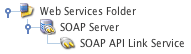
The SOAP setup
The SOAP API Link Service asset manages the link functions of the SOAP Server including creating, deleting, moving and updating links.
To add a SOAP API Link Service, go to Web Services -> SOAP API Link Service. For the API to work, it must be created under a SOAP Server within the Web Services folder, as shown in the figure to the right. The API will then be available to enable on the Details screen of the SOAP Server, as shown in the figure below.

The SOAP API Search Service available on the SOAP Server
You can configure the settings of the SOAP API Link Service on its associated asset screens. The majority of these screens are the same or similar to those for a Standard Page and are described in the Asset Screens manual. In this chapter we will describe the Details screen, which is different for a SOAP API Link Service.
Bookmarks to the headings on this page:
Details Screen
The Details screen allows you to configure the interface functions for the SOAP API Link Service. For more information about the Status, Future Status, Thumbnail and Details sections, refer to the Details Screen chapter in the Asset Screens manual.
Interface Settings
This section allows you to control which functions the SOAP API Link Service will be able to provide when enabled on a SOAP Server. The Interface Settings section of the Details screen is shown in the figure below.
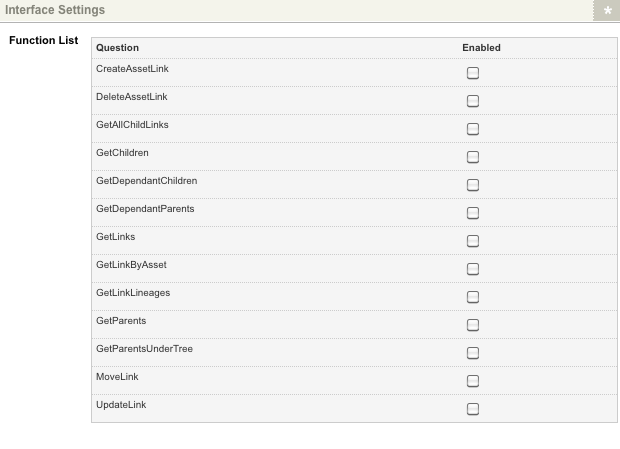
The Interface Settings section of the Details screen
In the Function List, select Enabled for the functions you want to make available on the API. For a full explanation of these functions, see the Operations section below.
Operations
The operations that are managed by the SOAP API Link Service are as follows:
- CreateAssetLink
- DeleteAssetLink
- GetAllChildLinks
- GetChildren
- GetDependantChildren
- GetDependantParents
- GetLinks
- GetLinkByAsset
- GetLinkLineages
- GetParents
- GetParentsUnderTree
- MoveLink
- UpdateLink
See the sections below for more information on each of the operations available on this API.
CreateAssetLink
| Elements - Parameter [Param Type] | Min Occurs | Max Occurs | Type | |
|---|---|---|---|---|
| CreateAssetLinkSoapInput CreateAssetLink | MajorID [string] MinorID [string] LinkType [LinkTypeValue] LinkValue [string] SortOrder [string] IsDependant [string] IsExclusive [string] | 1 1 0 0 0 0 0 | 1 1 1 1 1 1 1 | simple simple simple simple simple simple simple |
| CreateAssetLinkSoapOutput CreateAssetLinkResponse | CreateAssetLinkResult [string] | 0 | 1 | simple |
The CreateAssetLink operation will create a link between two specified assets. The parameters available for this operation are as follows:
- MajorID: the asset ID of the asset being linked to the minor asset (i.e. the major asset in the link, the Linked Parent). This parameter is mandatory.
- MinorID: the asset ID of the asset linking to the major asset (i.e. the minor asset in the link, the Linked ). This parameter is mandatory.
- LinkType: the Link Type value of the asset to create. For example, enter 4 to set the Link Type as a TYPE_3 link. For more information on the Link Type values available, refer to the Linking an Asset chapter of the Concepts manual. The default value for this parameter is 1.
- LinkValue: the value to associate with the asset Link Type.
- SortOrder: the sort order position that this asset should take on the Linking screen. The default value for this parameter is NULL. To specify a sort order position of
0, pass the value as a string inside quotes:"0". - IsDependant: indicates whether the minor asset will be dependently linked to the major asset. The value for this parameter should be either 1 (true) or 0 (false). The default value for this parameter is 0.
- IsExclusive: indicates whether the minor asset will be exclusively linked to the major asset. An exclusively linked asset will only be able to exist under only one parent. The value for this parameter should be either 1 (true) or 0 (false). The default value for this parameter is 0 (false).
Example Request
<SOAP-ENV:Envelope xmlns:SOAP-ENV="http://schemas.xmlsoap.org/soap/envelope/" xmlns:ns1="http://SYSTEM_ROOT_URL/_web_services/soap-server">
  <SOAP-ENV:Body>
    <ns1:CreateAssetLink>
      <MajorID>100</MajorID>
      <MinorID>200</MinorID>
      <LinkType>1</LinkType>
      <LinkValue>link_value</LinkValue>
      <SortOrder>"0"</SortOrder>
      <IsDependant>0</IsDependant>
      <IsExclusive>0</IsExclusive>
    </ns1:CreateAssetLink>
  </SOAP-ENV:Body>
</SOAP-ENV:Envelope>
Example Response
<SOAP-ENV:Envelope xmlns:SOAP-ENV="http://schemas.xmlsoap.org/soap/envelope/" xmlns:ns1="http://SYSTEM_ROOT_URL/_web_services/soap-server">
  <SOAP-ENV:Body>
    <ns1:CreateAssetLinkResponse>
      <CreateAssetLinkResult>620</CreateAssetLinkResult>
    </ns1:CreateAssetLinkResponse>
  </SOAP-ENV:Body>
</SOAP-ENV:Envelope>
DeleteAssetLink
| Elements - Parameter [Param Type] | Min Occurs | Max Occurs | Type | |
|---|---|---|---|---|
| DeleteAssetLinkSoapInput DeleteAssetLink | LinkID [string] | 1 | 1 | simple |
| DeleteAssetLinkSoapOutput DeleteAssetLinkResponse | DeleteAssetLinkResult [boolean] | 0 | 1 | simple |
The DeleteAssetLink operation will delete a specified link between two assets. The parameters available for this operation are as follows:
- LinkID: the asset ID of the link to delete. This parameter is mandatory.
Example Request
<SOAP-ENV:Envelope xmlns:SOAP-ENV="http://schemas.xmlsoap.org/soap/envelope/" xmlns:ns1="http://SYSTEM_ROOT_URL/_web_services/soap-server">
  <SOAP-ENV:Body>
    <ns1:DeleteAssetLink>
      <LinkID>1000</LinkID>
    </ns1:DeleteAssetLink>
  </SOAP-ENV:Body>
</SOAP-ENV:Envelope>
Example Response
<SOAP-ENV:Envelope xmlns:SOAP-ENV="http://schemas.xmlsoap.org/soap/envelope/" xmlns:ns1="http://SYSTEM_ROOT_URL/_web_services/soap-server">
  <SOAP-ENV:Body>
    <ns1:DeleteAssetLinkResponse>
      <DeleteAssetLinkResult>true</DeleteAssetLinkResult>
    </ns1:DeleteAssetLinkResponse>
  </SOAP-ENV:Body>
</SOAP-ENV:Envelope>
GetAllChildLinks
| Elements - Parameter [Param Type] | Min Occurs | Max Occurs | Type | |
|---|---|---|---|---|
| GetAllChildLinksSoapInput GetAllChildLinks | AssetID [string] LinkType [LinkTypeValue] | 1 0 | 1 1 | simple simple |
| GetAllChildLinksSoapOutput GetAllChildLinksResponse | GetAllChildLinksResult [LinkDetails] | 0 | / | complex |
The GetAllChildLinks operation will return all child links from a specified asset. The parameters available for this operation are as follows:
- AssetID: the asset ID of the asset to return child links from. This parameter is mandatory.
- LinkType: the LinkType of child links to return. This allows you to define specific link types to return. For more information on the Link Type values available, refer to the Linking an Asset chapter of the Concepts manual. The default value for this parameter is 0.
Example Request
<SOAP-ENV:Envelope xmlns:SOAP-ENV="http://schemas.xmlsoap.org/soap/envelope/" xmlns:ns1="http://SYSTEM_ROOT_URL/_web_services/soap-server">
  <SOAP-ENV:Body>
    <ns1:GetAllChildLinks>
      <AssetID>100</AssetID>
      <LinkType>2</LinkType>
    </ns1:GetAllChildLinks>
  </SOAP-ENV:Body>
</SOAP-ENV:Envelope>
Example Response
<SOAP-ENV:Envelope xmlns:SOAP-ENV="http://schemas.xmlsoap.org/soap/envelope/" xmlns:ns1="http://SYSTEM_ROOT_URL/_web_services/soap-server">
  <SOAP-ENV:Body>
    <ns1:GetAllChildLinksResponse>
      <GetAllChildLinksResult>
        <TreeID>00000000</TreeID>
        <LinkID>72</LinkID>
        <Level>2</Level>
        <AssetID>170</AssetID>
         <TypeCode>bodycopy</TypeCode>
        <LinkType>2</LinkType>
        <SortOrder>0</SortOrder>
        <Value></Value>
        <IsDependant>1</IsDependant>
        <IsExclusive>1</IsExclusive>
      </GetAllChildLinksResult>
      <GetAllChildLinksResult>
        <TreeID>000000000000</TreeID>
        <LinkID>73</LinkID>
        <Level>3</Level>
        <AssetID>171</AssetID>
        <TypeCode>bodycopy_div</TypeCode>
        <LinkType>2</LinkType>
        <SortOrder>0</SortOrder>
        <Value></Value>
        <IsDependant>1</IsDependant>
        <IsExclusive>0</IsExclusive>
      </GetAllChildLinksResult>
    </ns1:GetAllChildLinksResponse>
  </SOAP-ENV:Body>
</SOAP-ENV:Envelope>
GetChildren
| Elements - Parameter [Param Type] | Min Occurs | Max Occurs | Type | |
|---|---|---|---|---|
| GetChildrenSoapInput GetChildren | AssetID [string] TypeCode [string] StrictTypeCode [string] Dependant [string] SortBy [string] PermissionLevel [string] EffectiveAccess [string] MinDepth [string] MaxDepth [string] DirectShadowsOnly [string] LinkValueWanted [string] | 1 0 0 0 0 0 0 0 0 0 | 1 1 1 1 1 1 1 1 1 1 1 | simple simple simple simple simple simple simple simple simple simple simple |
| GetChildrenSoapOutput GetChildrenResponse | GetChildrenResult [ChildrenInfoSummary] | 0 | / | complex |
The GetChildren operation will return the children of a specified asset. The parameters available for this operation are as follows:
- AssetID: the asset ID of the asset to return children from. This parameter is mandatory.
- TypeCode: the asset type of the assets to return.
- StrictTypeCode: indicates whether to return only assets of the specified asset type or also include its subclasstypes. The value for this parameter should be either TRUE (specified asset type) or FALSE (include subclasses) (or 1 or 0). The default value for this parameter is TRUE.
- Dependant: indicates whether to return assets that are dependently linked to the specified asset ID or only non-dependant assets. The value for this parameter should be either TRUE (dependant) or FALSE (non-dependant) (or 1 or 0). The default value for this parameter is NULL.
- SortBy: the sort value, indicating how the returned results will be ordered. For example, type_code, short_name or created. The default value for this parameter is NULL.
- PermissionLevel: the permission level of the assets to return. The value for this parameter should be Read, Write or Admin. The default value for this parameter is NULL.
- EffectiveAccess: indicates whether effective access will be used. This means that if Write Permission is selected, Read will also be selected. Similarly, if Admin Permission is selected, both Read and Write Permission will be selected. The value for this parameter should be either TRUE or FALSE (or 1 or 0). The default value for this parameter is TRUE.
- MinDepth: specifies minimum number of levels below the specified asset, returned child assets must be. The default value for this parameter is NULL.
- MaxDepth: specifies maximum number of levels below the specified asset, returned child assets must be. The default value for this parameter is NULL.
- DirectShadowsOnly: indicates whether to return only direct shadow asset children or all shadow asset children of different levels. The value for this parameter should be either TRUE (direct) or FALSE (all) (or 1 or 0). The default value for this parameter is TRUE.
- LinkValueWanted: the link values to return the children for. This allows you to define specifically linked child assets to return. The default value for this parameter is NULL.
Example Request
<SOAP-ENV:Envelope xmlns:SOAP-ENV="http://schemas.xmlsoap.org/soap/envelope/" xmlns:ns1="http://SYSTEM_ROOT_URL/_web_services/soap-server">
  <SOAP-ENV:Body>
    <ns1:GetChildren>
      <AssetID>100</AssetID>
      <TypeCode>page</TypeCode>
      <StrictTypeCode>0</StrictTypeCode>
      <Dependant>0</Dependant>
      <SortBy>short_name</SortBy>
      <PermissionLevel>admin</PermissionLevel>
      <EffectiveAccess>1</EffectiveAccess>
      <MinDepth>1</MinDepth>
      <MaxDepth>5</MaxDepth>
     </ns1:GetChildren>
  </SOAP-ENV:Body>
</SOAP-ENV:Envelope>
Example Response
<SOAP-ENV:Envelope xmlns:SOAP-ENV="http://schemas.xmlsoap.org/soap/envelope/" xmlns:ns1="http://SYSTEM_ROOT_URL/_web_services/soap-server">
  <SOAP-ENV:Body>
    <ns1:GetChildrenResponse>
      <GetChildrenResult>
        <AssetID>270</AssetID>
        <TypeCode>page_standard</TypeCode>
      </GetChildrenResult>
      <GetChildrenResult>
        <AssetID>283</AssetID>
        <TypeCode>page_standard</TypeCode>
      </GetChildrenResult>
    <ns1:GetChildrenResponse>
  </SOAP-ENV:Body>
</SOAP-ENV:Envelope>
GetDependantChildren
| Elements - Parameter [Param Type] | Min Occurs | Max Occurs | Type | |
|---|---|---|---|---|
| GetDependantChildrenSoapInput GetDependantChildren | AssetID [string] TypeCode [AssetType] StrictTypeCode [boolean] | 1 0 0 | 1 1 1 | simple simple simple |
| GetDependantChildrenSoapOutput GetDependantChildrenResponse | GetDependantChildrenResult [LinkInfoSummary] | 0 | / | complex |
The GetDependantChildren operation will return dependant children of a specified asset. The parameters available for this operation are as follows:
- AssetID: the asset ID of the asset to return dependant children from. This parameter is mandatory.
- TypeCode: the asset type of the assets to return. This allows you to define specific asset types to return.
- StrictTypeCode: indicates whether to return only assets of the specified asset type or also include its subclass types. The value for this parameter should be either TRUE (specified asset type) or FALSE (include subclasses). The default value for this parameter is TRUE.
Example Request
<SOAP-ENV:Envelope xmlns:SOAP-ENV="http://schemas.xmlsoap.org/soap/envelope/" xmlns:ns1="http://SYSTEM_ROOT_URL/_web_services/soap-server">
  <SOAP-ENV:Body>
    <ns1:GetDependantChildren>
      <AssetID>70</AssetID>
      <TypeCode>bodycopy</TypeCode>
      <StrictTypeCode>FALSE</StrictTypeCode>
    </ns1:GetDependantChildren>
  </SOAP-ENV:Body>
</SOAP-ENV:Envelope>
Example Response
<SOAP-ENV:Envelope xmlns:SOAP-ENV="http://schemas.xmlsoap.org/soap/envelope/" xmlns:ns1="http://SYSTEM_ROOT_URL/_web_services/soap-server">
  <SOAP-ENV:Body>
    <ns1:GetDependantChildrenResponse>
      <GetDependantChildrenResult>
        <AssetID>71</AssetID>
        <TypeCode>bodycopy</TypeCode>
      </GetDependantChildrenResult>
    </ns1:GetDependantChildrenResponse>
  </SOAP-ENV:Body>
</SOAP-ENV:Envelope>
GetDependantParents
| Elements - Parameter [Param Type] | Min Occurs | Max Occurs | Type | |
|---|---|---|---|---|
| GetDependantParentsSoapInput GetDependantParents | AssetID [string] TypeCode [string] StrictTypeCode [boolean] IncludeAllDependants [boolean] | 1 0 0 0 | 1 1 1 1 | simple simple simple simple |
| GetDependantParentsSoapOutput GetDependantParentsResponse | GetDependantParentsResult [LinkInfoSummary] | 0 | / | complex |
The GetDependantParents operation will return the dependant parents of a specified asset. The parameters available for this operation are as follows:
- AssetID: the asset ID of the asset to return dependent parents from. This parameter is mandatory.
- TypeCode: the asset type of the assets to return. This allows you to define specific link types to return.
- StrictTypeCode: indicates whether to return only assets of the specified asset type or also include its subclass types. The value for this parameter should be either TRUE (specified asset type) or FALSE (include subclasses). The default value for this parameter is TRUE.
- IncludeAllDependants: indicates whether to return assets that are dependently linked to the specified asset ID or only non-dependant assets. The value for this parameter should be either TRUE (dependant) or FALSE (non-dependant). The default value for this parameter is TRUE.
Example Request
<SOAP-ENV:Envelope xmlns:SOAP-ENV="http://schemas.xmlsoap.org/soap/envelope/" xmlns:ns1="http://SYSTEM_ROOT_URL/_web_services/soap-server">
  <SOAP-ENV:Body>
    <ns1:GetDependantParents>
      <AssetID>100</AssetID>
      <TypeCode>form</TypeCode>
      <StrictTypeCode>FALSE</StrictTypeCode>
      <IncludeAllDependants>TRUE</IncludeAllDependants>
    </ns1:GetDependantParents>
  </SOAP-ENV:Body>
</SOAP-ENV:Envelope>
Example Response
<SOAP-ENV:Envelope xmlns:SOAP-ENV="http://schemas.xmlsoap.org/soap/envelope/" xmlns:ns1="http://SYSTEM_ROOT_URL/_web_services/soap-server">
  <SOAP-ENV:Body>
    <ns1:GetDependantParentsResponse>
      <GetDependantParentsResult>
        <AssetID>99</AssetID>
      </GetDependantParentsResult>
    </ns1:GetDependantParentsResponse>
  </SOAP-ENV:Body>
</SOAP-ENV:Envelope>
GetLinks
| Elements - Parameter [Param Type] | Min Occurs | Max Occurs | Type | |
|---|---|---|---|---|
| GetLinksSoapInput GetLinks | AssetID [string] LinkType [LinkTypeValue] TypeCode [AssetType] StrictTypeCode [boolean] SideOfLink [string] LinkValue [string] Dependant [boolean] Exclusive [boolean] SortBy [string] PermissionLevel [string] Effective [boolean] | 1 0 0 0 0 0 0 0 0 0 0 | 1 1 1 1 1 1 1 1 1 1 1 | simple simple simple simple simple simple simple simple simple simple simple |
| GetLinksSoapOutput GetLinksResponse | GetLinksResult [LinkDetails] | 0 | / | complex |
The GetLinks operation will return the links of a specified asset. The parameters available for this operation are as follows:
- AssetID: the asset ID of the asset to return links from. This parameter is mandatory.
- LinkType: the link type of asset links to return. This allows you to define specific link levels to return. For more information on the Link Type values available, refer to the Linking an Asset chapter of the Concepts manual. The default value for this parameter is 1.
- TypeCode: the asset type of the assets linked with the selected asset. This allows you to define the links of specific asset types to return. For example, page_standard would only return links to standard pages.
- StrictTypeCode: indicates whether to return only links to the specified asset type or also include its subclass types. The value for this parameter should be either TRUE (specified asset type) or FALSE (include subclasses). The default value for this parameter is TRUE.
- SideOfLink: indicates which side of the link the asset (specified on the AssetID parameter) is on: either major or minor (case-sensitive). Using the minor option on this parameter will return links where the specified asset is the minor asset (i.e. the Linked Parents of the asset), while the major option will return the links where the asset is the major asset (its Linked Children). The default value for this parameter is major.
- LinkValue: the link values to return. This allows you to define specific links to return. The default value for this parameter is NULL.
- Dependant: indicates whether the links to return are dependant links. The value for this parameter should be either TRUE or FALSE (or 1 or 0). The default value for this parameter is NULL.
- Exclusive: indicates whether the links to return are exclusive links. The value for this parameter should be either TRUE or FALSE (or 1 or 0). The default value for this parameter is NULL.
- SortBy: the sort value, indicating how the returned results will be ordered. For example, type_code, short_name or created. The default value for this parameter is NULL.
- PermissionLevel: the permission level of the assets to return links from. The value for this parameter should be Read, Write or Admin. The default value for this parameter is NULL.
- Effective: indicates whether effective access will be used. This means that if Write Permission is selected, Read Permission will also be selected. Similarly, if Admin Permission is selected, both Read and Write Permission will be selected. The value for this parameter should be either TRUE or FALSE (or 1 or 0). The default value for this parameter is TRUE.
Example Request
<SOAP-ENV:Envelope xmlns:SOAP-ENV="http://schemas.xmlsoap.org/soap/envelope/" xmlns:ns1="http://SYSTEM_ROOT_URL/_web_services/soap-server">
  <SOAP-ENV:Body>
    <ns1:GetLinks>
      <AssetID>100</AssetID>
      <LinkType>1</LinkType>
      <TypeCode>file</TypeCode>
      <StrictTypeCode>FALSE</StrictTypeCode>
      <SideOfLink>Major</SideOfLink>
      <LinkValue>link_value</LinkValue>
      <Dependant>TRUE</Dependant>
      <Exclusive>FALSE</Exclusive>
      <SortBy>assetid</SortBy>
      <PermissionLevel>read</PermissionLevel>
      <Effective></Effective>
    </ns1:GetLinks>
  </SOAP-ENV:Body>
</SOAP-ENV:Envelope>
Example Response
<SOAP-ENV:Envelope xmlns:SOAP-ENV="http://schemas.xmlsoap.org/soap/envelope/" xmlns:ns1="http://SYSTEM_ROOT_URL/_web_services/soap-server">
  <SOAP-ENV:Body>
    <ns1:GetLinksResponse>
      <GetLinksResult>
        <LinkID>712</LinkID>
        <MinorID>300</MinorID>
        <MinorTypeCode>word_doc</MinorTypeCode>
        <LinkType>1</LinkType>
        <SortOrder>23</SortOrder>
        <Value></Value>
        <IsDependant>0</IsDependant>
        <IsExclusive>0</IsExclusive>
      </GetLinksResult>
      <GetLinksResult>
        <LinkID>817</LinkID>
        <MinorID>340</MinorID>
        <MinorTypeCode>image</MinorTypeCode>
        <LinkType>1</LinkType>
        <SortOrder>38</SortOrder>
        <Value></Value>
        <IsDependant>0</IsDependant>
        <IsExclusive>0</IsExclusive>
      </GetLinksResult>
    </ns1:GetLinksResponse>
  </SOAP-ENV:Body>
</SOAP-ENV:Envelope>
GetLinkByAsset
| Elements - Parameter [Param Type] | Min Occurs | Max Occurs | Type | |
|---|---|---|---|---|
| GetLinkByAssetSoapInput GetLinkByAsset | AssetID [string] OtherAssetID [string] LinkType [LinkTypeValue] LinkValue [string] SideOfLink [string] IsDependant [boolean] IsExclusive [boolean] | 1 1 0 0 0 0 0 | 1 1 1 1 1 1 1 | simple simple simple simple simple simple simple |
| GetLinkByAssetSoapOutput GetLinkByAssetResponse | GetLinkByAssetResult [LinkDetails] | 0 | / | complex |
The GetLinkByAssets operation will return all links between two specified assets. The parameters available for this operation are as follows:
- AssetID: the asset ID of the first specified asset. This parameter is mandatory.
- OtherAssetID: the asset ID of the second specified asset. This parameter is mandatory.
- LinkType: the link type of asset links to return. This allows you to define specific links levels to return. For more information on the Link Type values available, refer to the Linking an Asset chapter of the Concepts manual. The default value for this parameter is NULL.
- LinkValue: the link values to return. This allows you to define specific links to return. The default value for this parameter is NULL.
- SideOfLink: indicates whether the asset specified in the AssetID parameter is the major or minor of the two assets. This will determine the link information that is returned. By default, the first specified asset will act as the major asset, i.e. the Linked Parent. Using the minor option in this parameter will indicate that the first specified asset is the minor asset, i.e. the Linked Child. The default value for this parameter is major.
- IsDependant: indicates whether the links to return are dependant links. The value for this parameter should be either TRUE or FALSE (or 1 or 0). The default value for this parameter is NULL.
- IsExclusive: indicates whether the links to return are exclusive links. The value for this parameter should be either TRUE or FALSE (or 1 or 0). The default value for this parameter is NULL.
Example Request
<SOAP-ENV:Envelope xmlns:SOAP-ENV="http://schemas.xmlsoap.org/soap/envelope/" xmlns:ns1="http://SYSTEM_ROOT_URL/_web_services/soap-server">
  <SOAP-ENV:Body>
    <ns1:GetLinkByAsset>
      <AssetID>70</AssetID>
      <OtherAssetID>69</OtherAssetID>
      <LinkType>1</LinkType>
      <LinkValue>link_value</LinkValue>
      <SideOfLink>minor</SideOfLink>
      <IsDependant>TRUE</IsDependant>
      <IsExclusive>FALSE</IsExclusive>
    </ns1:GetLinkByAsset>
  </SOAP-ENV:Body>
</SOAP-ENV:Envelope>
Example Response
<SOAP-ENV:Envelope xmlns:SOAP-ENV="http://schemas.xmlsoap.org/soap/envelope/" xmlns:ns1="http://SYSTEM_ROOT_URL/_web_services/soap-server">
  <SOAP-ENV:Body>
    <ns1:GetLinkByAssetResponse>
      <GetLinkByAssetResult>
        <LinkID>71</LinkID>
        <MajorID>69</MajorID>
        <MajorTypeCode>site</MajorTypeCode>
        <LinkType>1</LinkType>
        <SortOrder>"0"</SortOrder>
        <Value></Value>
        <IsDependant>0</IsDependant>
        <IsExclusive>0</IsExclusive>
      </GetLinkByAssetResult>
    </ns1:GetLinkByAssetResponse>
  </SOAP-ENV:Body>
</SOAP-ENV:Envelope>
GetLinkLineages
| Elements - Parameter [Param Type] | Min Occurs | Max Occurs | Type | |
|---|---|---|---|---|
| GetLinkLineagesSoapInput GetLinkLineages | AssetID [string] RootNode [string] | 1 0 | 1 1 | simple simple |
| GetLinkLineagesSoapOutput GetLinkLineagesResponse | GetLinkLineagesResult [LineagesDetails] | 0 | / | complex |
The GetLinkLineages operation will return the link types, IDs and lineages of a specified asset. The parameters available for this operation are as follows:
- AssetID: the asset ID of the asset to return link lineages from. This parameter is mandatory.
- RootNode: enter a root node to specify the link lineage to return for an asset linked under multiple assets.
Example Request
<SOAP-ENV:Envelope xmlns:SOAP-ENV="http://schemas.xmlsoap.org/soap/envelope/" xmlns:ns1="http://SYSTEM_ROOT_URL/_web_services/soap-server">
  <SOAP-ENV:Body>
    <ns1:GetLinkLineages>
      <AssetID>150</AssetID>
      <RootNode>100</RootNode>
    </ns1:GetLinkLineages>
  </SOAP-ENV:Body>
</SOAP-ENV:Envelope>
Example Response
<SOAP-ENV:Envelope xmlns:SOAP-ENV="http://schemas.xmlsoap.org/soap/envelope/" xmlns:ns1="http://SYSTEM_ROOT_URL/_web_services/soap-server">
  <SOAP-ENV:Body>
     <ns1:GetLinkLineagesResponse>
      <GetLinkLineagesResult>
        <LinkID>338</LinkID>
        <LinkType>1</LinkType>
        <Lineage>
          <AssetID>69</AssetID>
          <AssetName>Site</AssetName>
          <Order>0</Order>
        </Lineage>
        <Lineage>
          <AssetID>70</AssetID>
          <AssetName>Home</AssetName>
          <Order>1</Order>
        </Lineage>
        <Lineage>
          <AssetID>93</AssetID>
          <AssetName>About Us</AssetName>
          <Order>2</Order>
        </Lineage>
      </GetLinkLineagesResult>
    </ns1:GetLinkLineagesResponse>
  </SOAP-ENV:Body>
</SOAP-ENV:Envelope>
GetParents
| Elements - Parameter [Param Type] | Min Occurs | Max Occurs | Type | |
|---|---|---|---|---|
| GetParentsSoapInput GetParents | AssetID [string] TypeCode [AssetType] StrictTypeCode [string] SortBy [string] PermissionLevel [string] Effective [string] MinDepth [string] MaxDepth [string] DirectShadowOnly [string] LinkValueWanted [string] | 1 0 0 0 0 0 0 0 0 0 | 1 1 1 1 1 1 1 1 1 1 | simple simple simple simple simple simple simple simple simple simple |
| GetParentsSoapOutput GetParentsResponse | GetParentsResult [LinkInfoSummary] | 0 | / | complex |
The GetParents operation will return all parents of a specified asset. The parameters available for this operation are as follows:
- AssetID: the asset ID of the asset to return parents from. This parameter is mandatory.
- TypeCode: the asset type of the assets being returned.
- StrictTypeCode: indicates whether to return only assets of the specified asset type or also include its subclass types. The value for this parameter should be either TRUE (specified asset type) or FALSE (include subclasses) (or 1 or 0). The default value for this parameter is TRUE.
- SortBy: the sort value, indicating how the returned results will be ordered. For example, type_code, short_name or created. The default value for this parameter is NULL.
- PermissionLevel: the permission level of the asset to return link from. The value for this parameter should be Read, Write or Admin. The default value for this parameter is NULL.
- Effective: indicates whether effective access will be used. This means that if Write Permission is selected, Read Permission will also be selected. Similarly, if Admin Permission is selected, both Read and Write Permission will be selected. The value for this parameter should be either TRUE or FALSE (or 1 or 0). The default value for this parameter is TRUE.
- MinDepth: specifies the minimum number of levels above the specified asset returned parent assets must be. The default value for this parameter is NULL.
- MaxDepth: specifies the maximum number of levels above the specified asset returned parents assets must be. The default value for this parameter is NULL.
- DirectShadowOnly: indicates whether to return only direct shadow asset parents or all shadow asset parents of different levels. The value for this parameter should be either TRUE or FALSE (or 1 or 0). The default value for this parameter is FALSE.
- LinkValueWanted: the link values to return the parent assets for. This allows you to define specifically linked parent assets to return. The default value for this parameter is NULL.
Example Request
<SOAP-ENV:Envelope xmlns:SOAP-ENV="http://schemas.xmlsoap.org/soap/envelope/" xmlns:ns1="http://SYSTEM_ROOT_URL/_web_services/soap-server">
  <SOAP-ENV:Body>
    <ns1:GetParents>
      <AssetID>100</AssetID>
      <TypeCode>page_standard</TypeCode>
      <StrictTypeCode>0</StrictTypeCode>
      <SortBy>name</SortBy>
      <PermissionLevel>Write</PermissionLevel>
      <Effective>0</Effective>
      <MinDepth>1</MinDepth>
      <MaxDepth>5</MaxDepth>
      <DirectShadowOnly>1</DirectShadowOnly>
      <LinkValueWanted>link_value</LinkValueWanted>
    </ns1:GetParents>
  </SOAP-ENV:Body>
</SOAP-ENV:Envelope>
Example Response
<SOAP-ENV:Envelope xmlns:SOAP-ENV="http://schemas.xmlsoap.org/soap/envelope/" xmlns:ns1="http://SYSTEM_ROOT_URL/_web_services/soap-server">
  <SOAP-ENV:Body>
    <ns1:GetParentsResponse>
      <GetParentsResult>
        <AssetID>69</AssetID>
        <TypeCode>page_standard</TypeCode>
      </GetParentsResult>
      <GetParentsResult>
        <AssetID>70</AssetID>
        <TypeCode>page_standard</TypeCode>
      </GetParentsResult>
    </ns1:GetParentsResponse>
  </SOAP-ENV:Body>
</SOAP-ENV:Envelope>
GetParentsUnderTree
| Elements - Parameter [Param Type] | Min Occurs | Max Occurs | Type | |
|---|---|---|---|---|
| GetParentsSoapInput GetParents | AssetID [string] RootID [string] MinLevel [string] MaxLevel [string] | 1 1 1 1 | 1 1 1 1 | simple simple simple simple |
| GetParentsSoapOutput GetParentsResponse | Parent Paths [ParentPathsDetails] | 0 | / | complex |
The GetParentsUnderTree operation will return the parents of an asset under a link tree, specified by a root node. The parameters available for the operation are as follows:
- AssetID: the asset ID of the asset to return parents from. This parameter is mandatory.
- RootID: the root node ID for the link tree, under which to return parents. This parameter is mandatory.
- MinLevel: specifies the minimum number of levels above the specified asset returned parent assets must be. This parameter is mandatory. The default value for this parameter is NULL.
- MaxLevel: specifies the maximum number of levels above the specified asset returned parents assets must be. This parameter is mandatory. The default value for this parameter is NULL.
Example Request
<SOAP-ENV:Envelope xmlns:SOAP-ENV="http://schemas.xmlsoap.org/soap/envelope/" xmlns:ns1="http://SYSTEM_ROOT_URL/_web_services/soap-server">
  <SOAP-ENV:Body>
    <ns1:GetParentsUnderTree>
      <AssetID>150</AssetID>
      <RootID>100</RootID>
      <MinLevel>2</MinLevel>
      <MaxLevel>5</MaxLevel>
    </ns1:GetParentsUnderTree>
  </SOAP-ENV:Body>
</SOAP-ENV:Envelope>
Example Response
<SOAP-ENV:Envelope xmlns:SOAP-ENV="http://schemas.xmlsoap.org/soap/envelope/" xmlns:ns1="http://SYSTEM_ROOT_URL/_web_services/soap-server">
  <SOAP-ENV:Body>
    <ns1:GetParentsUnderTreeResponse>
      <ParentPaths>
        <LinkID>338</LinkID>
        <LinkType>1</LinkType>
        <ParentAssets>
          <ParentID>70</ParentID>
          <ParentName>Home</ParentName>
        </ParentAssets>
        <ParentAssets>
          <ParentID>93</ParentID>
          <ParentName>About Us</ParentName>
        </ParentAssets>
      </ParentPaths>
    </ns1:GetParentsUnderTreeResponse>
  </SOAP-ENV:Body>
</SOAP-ENV:Envelope>
MoveLink
| Elements - Parameter [Param Type] | Min Occurs | Max Occurs | Type | |
|---|---|---|---|---|
| MoveLinkSoapInput MoveLink | LinkID [string] LinkType [LinkTypeValue] ToParentID [string] ToParentPosition [string] | 1 0 0 0 | 1 1 1 1 | simple simple simple simple |
| MoveLinkSoapOutput MoveLinkResponse | MoveLinkResult [integer] | 0 | 1 | simple |
The MoveLink operation will move a link under a new parent asset. The parameters available for this operation are as follows:
- LinkID: The asset ID of the link to move. This parameter is mandatory.
- LinkType: the link type of the link under the new parent asset. For more information on the Link Type values available, refer to the Linking an Asset chapter of the Concepts manual. The default value for this parameter is 0.
- ToParentID: the asset ID of the parent where the link will be moved. The default value for this parameter is 0.
- ToParentPosition: the moved link's position under its parent in the asset map. The default value for this parameter is 0.
Example Request
<SOAP-ENV:Envelope xmlns:SOAP-ENV="http://schemas.xmlsoap.org/soap/envelope/" xmlns:ns1="http://SYSTEM_ROOT_URL/_web_services/soap-server">
  <SOAP-ENV:Body>
    <ns1:MoveLink>
      <LinkID>1000</LinkID>
      <LinkType>2</LinkType>
      <ToParentID>100</ToParentID>
      <ToParentPosition>1</ToParentPosition>
    </ns1:MoveLink>
  </SOAP-ENV:Body>
</SOAP-ENV:Envelope>
Example Response
<SOAP-ENV:Envelope xmlns:SOAP-ENV="http://schemas.xmlsoap.org/soap/envelope/" xmlns:ns1="http://SYSTEM_ROOT_URL/_web_services/soap-server">
  <SOAP-ENV:Body>
    <ns1:MoveLinkResponse>
      <MoveLinkResult>392</MoveLinkResult>
    </ns1:MoveLinkResponse>
  </SOAP-ENV:Body>
</SOAP-ENV:Envelope>
UpdateLink
| Elements - Parameter [Param Type] | Min Occurs | Max Occurs | Type | |
|---|---|---|---|---|
| UpdateLinkSoapInput UpdateLink | LinkID [string] LinkType [LinkTypeValue] LinkValue [string] SortOrder [string] | 1 0 0 0 | 1 1 1 1 | simple simple simple simple |
| UpdateLinkSoapOutput UpdateLinkResponse | UpdateLinkResult [string] | 0 | 1 | simple |
The UpdateLink operation will update an existing link within the system. The parameters available for this operation are as follows:
- LinkID: The asset ID of the link to update. This parameter is mandatory.
- LinkType: the link type that this link should be updated to. For more information on the Link Type values available, refer to the Linking an Asset chapter of the Concepts manual. The default value for this parameter is NULL (all link types).
- LinkValue: the link value to use for the updated link. The default value for this parameter is NULL.
- SortOrder: the sort order position that the updated link should take. The default value for this parameter is NULL. To specify a sort order position of
0, pass the value as a string inside quotes:"0".
Example Request
<SOAP-ENV:Envelope xmlns:SOAP-ENV="http://schemas.xmlsoap.org/soap/envelope/" xmlns:ns1="http://SYSTEM_ROOT_URL/_web_services/soap-server">
  <SOAP-ENV:Body>
    <ns1:UpdateLink>
      <LinkID>1000</LinkID>
      <LinkType>2</LinkType>
      <LinkValue>new_value</LinkValue>
      <SortOrder>1</SortOrder>
    </ns1:UpdateLink>
  </SOAP-ENV:Body>
</SOAP-ENV:Envelope>
Example Response
<SOAP-ENV:Envelope xmlns:SOAP-ENV="http://schemas.xmlsoap.org/soap/envelope/" xmlns:ns1="http://SYSTEM_ROOT_URL/_web_services/soap-server">
  <SOAP-ENV:Body>
    <ns1:UpdateLinkResponse>
      <UpdateLinkResult>1</UpdateLinkResult>
    </ns1:UpdateLinkResponse>
  </SOAP-ENV:Body>
</SOAP-ENV:Envelope>